KIOXIA EXCERIA PRO G2 铠侠 VE10 固态硬盘测评
最近刚发布的 KIOXIA EXCERIA PRO G2 SSD(铠侠 VE10 固态硬盘),网上还没搜到有人测试过。
Product Brief. 参数可见官方网站:EXCERIA PRO G2 - NVMe™ SSD | KIOXIA - Europe (English)
| Capacity(T) | Sequential Read(MB/s) | Sequential Write(MB/s) | Random Read | Random Write | Active Power(W) |
|---|---|---|---|---|---|
| 1 | 14400 | 12700 | 2000000 | 1900000 | 9.6 |
| 2 | 14900 | 13400 | 2250000 | 1950000 | 8.4 |
| 4 | 14900 | 13700 | 2300000 | 1950000 | 8.5 |
静态功率:
PS3: 50 mW (typ.)
PS4: 5 mW (typ.)
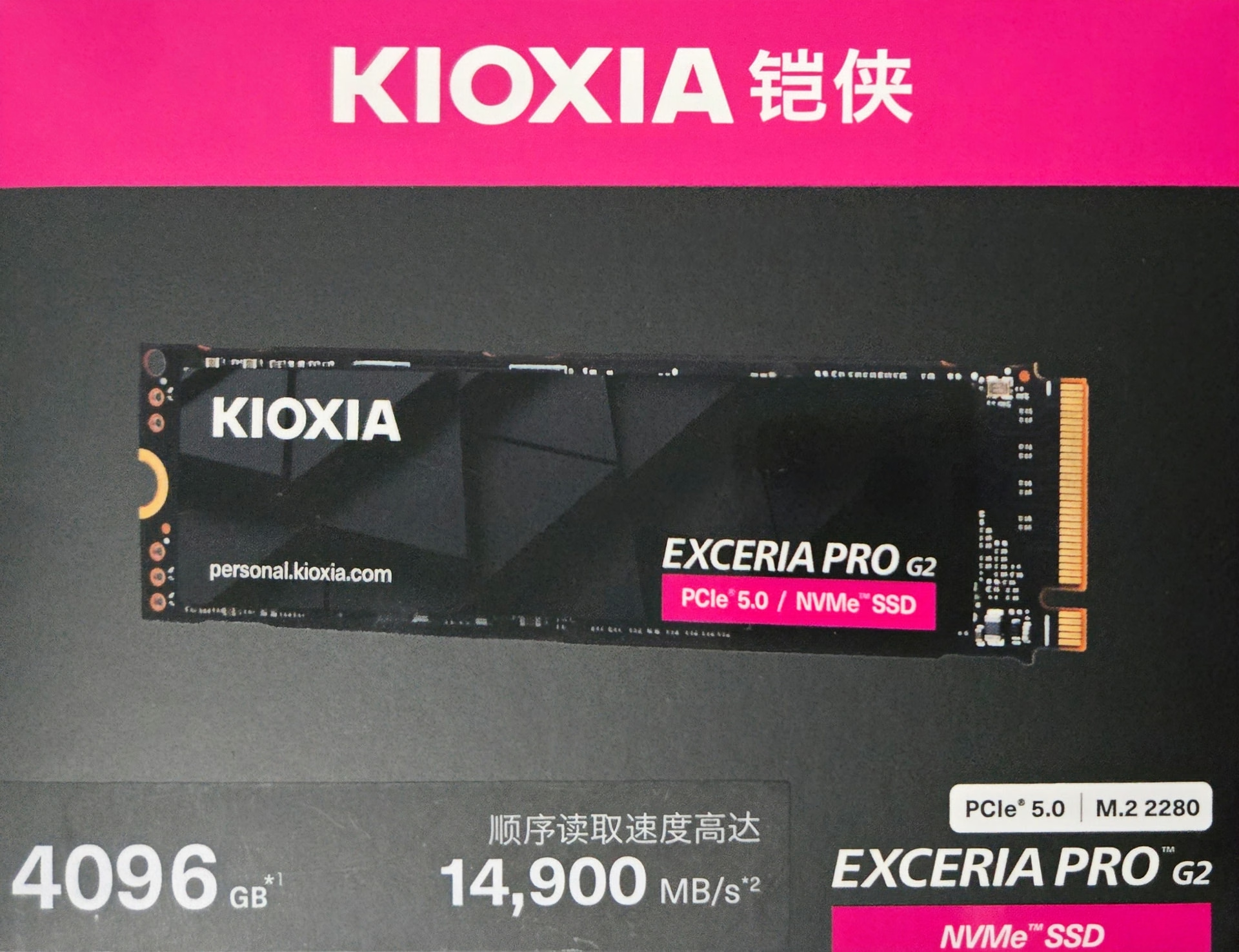
我买的容量为 4TB,PCIe5.0x4,TLC 颗粒。
JD ¥2999 购入(原价 3299,有一次点进去弹出来一个 300 的优惠券)。
考虑到存储的涨价,以及 慧榮 CEO 说 30 年之前不会有 6.0 的盘:
Wallace C. Kou: For consumer? You will not see any PCIe Gen6 [solutions] until 2030.
虽然我没有一台电脑有 PCIe5.0 的接口,但这块市面上 PCIe5.0 中最便宜、甚至比有些 PCIe4.0 的都要便宜的盘应该能在未来战很多年了。
实景拍摄
背面:
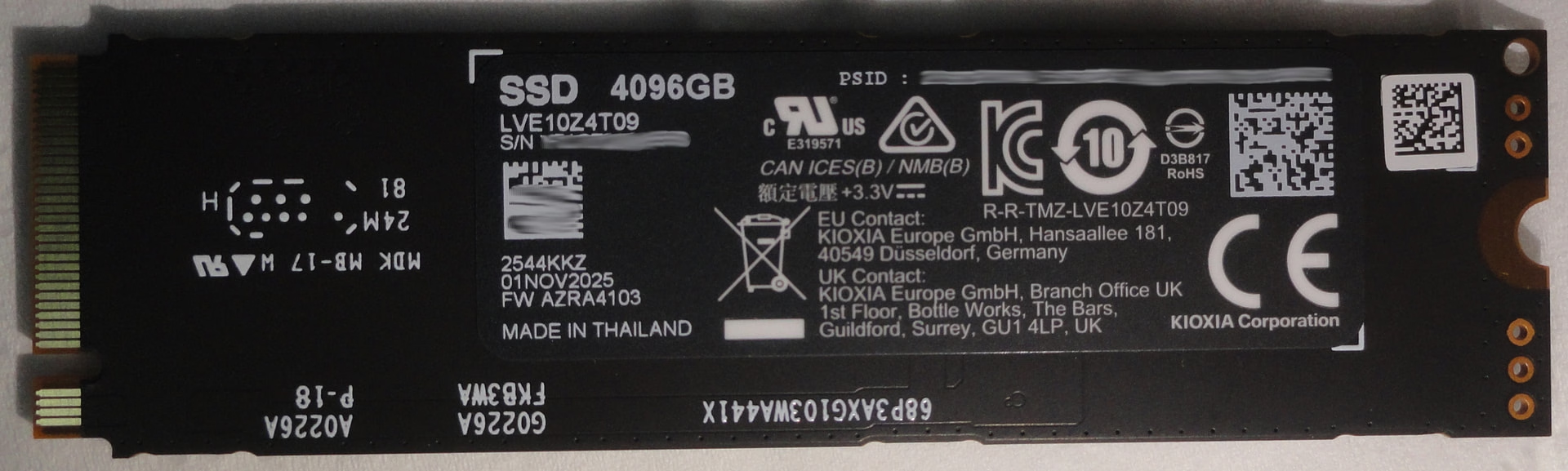
正面:
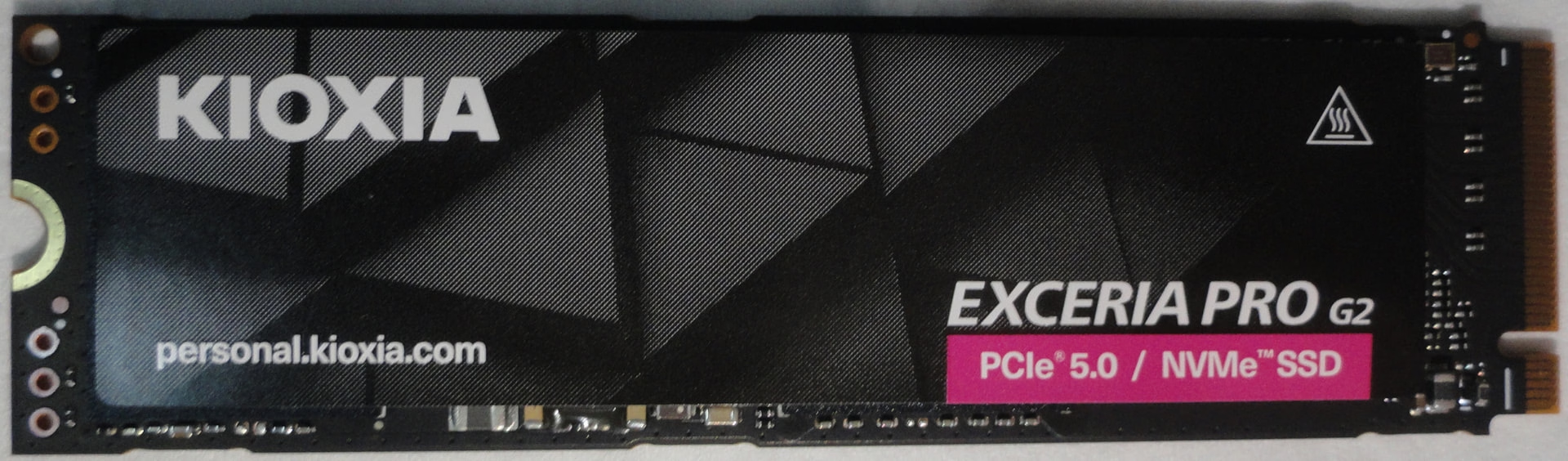
正面去除掉贴纸后:
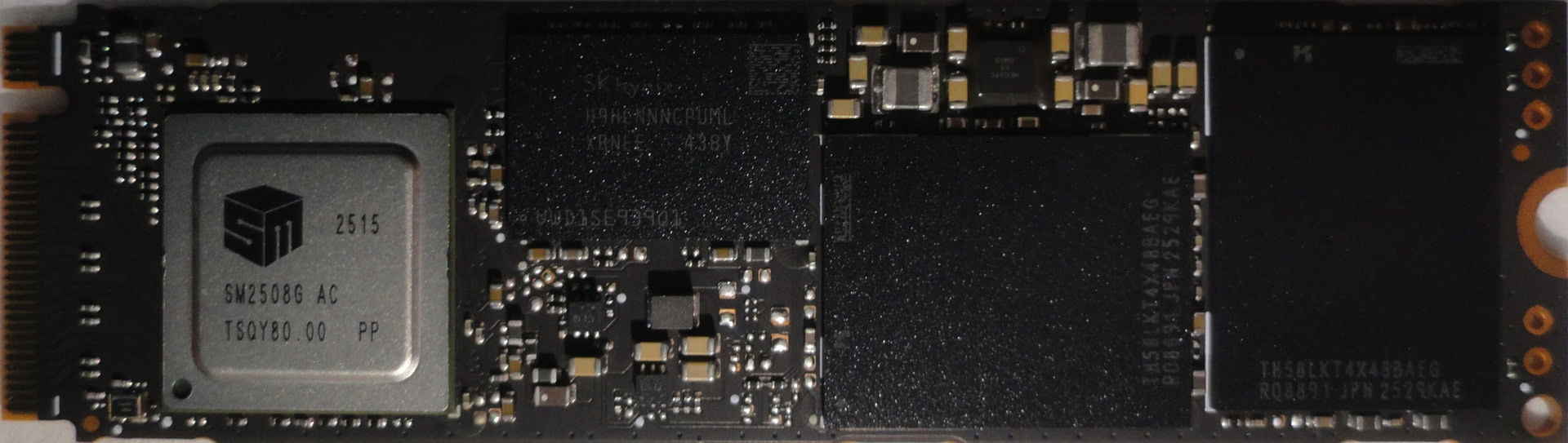
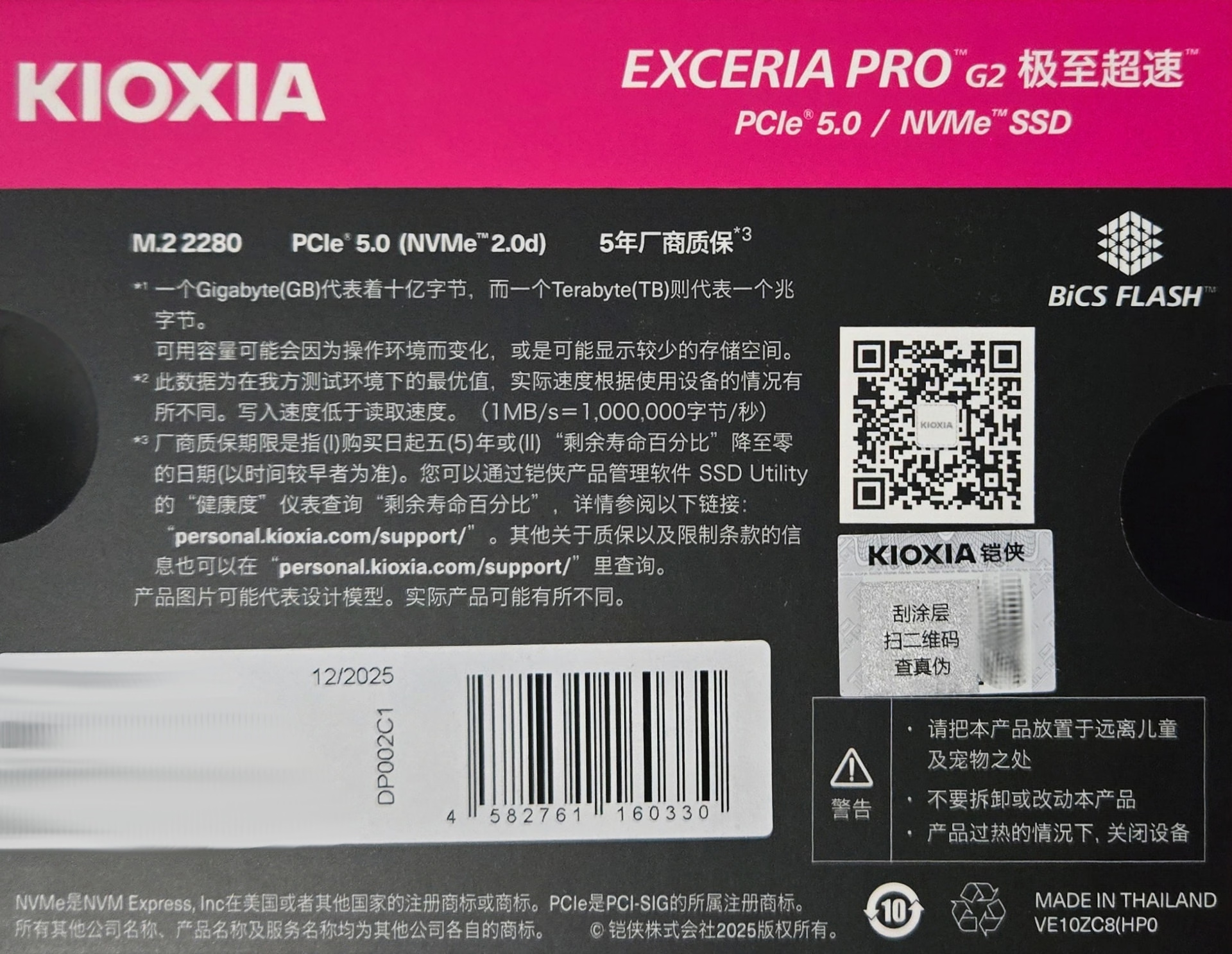


可以看到主控是 SM2508,这颗主控从国内品牌 佰维 BWIN/宏碁掠夺者、江波龙/Lexar,到国际品牌 WD SN8100,Micron Crucial T710 的几乎全部旗舰型号都在用。TSMC 6nm,能效比很好。
鉴于这是铠侠 Kioxia,这颗主控让我比较意外,我原先以为会用 Kioxia 亲儿子 群联的 Phison E28,之前 Kioxia 几乎全部使用 Phison 的主控。
单面颗粒设计。共有两颗,分别是 2TB,加在一起 4TB。
NAND 颗粒的密度非常高,应该是 BiCS v8 2XX 层。
DDR 缓存来自 SK Hynix.
本来想用 flashid 看颗粒的信息,但 SMI nvme flash id 运行驱动报错。
根据丝印查询 SK Hynix LPDDR4X 内存颗粒的信息如下:
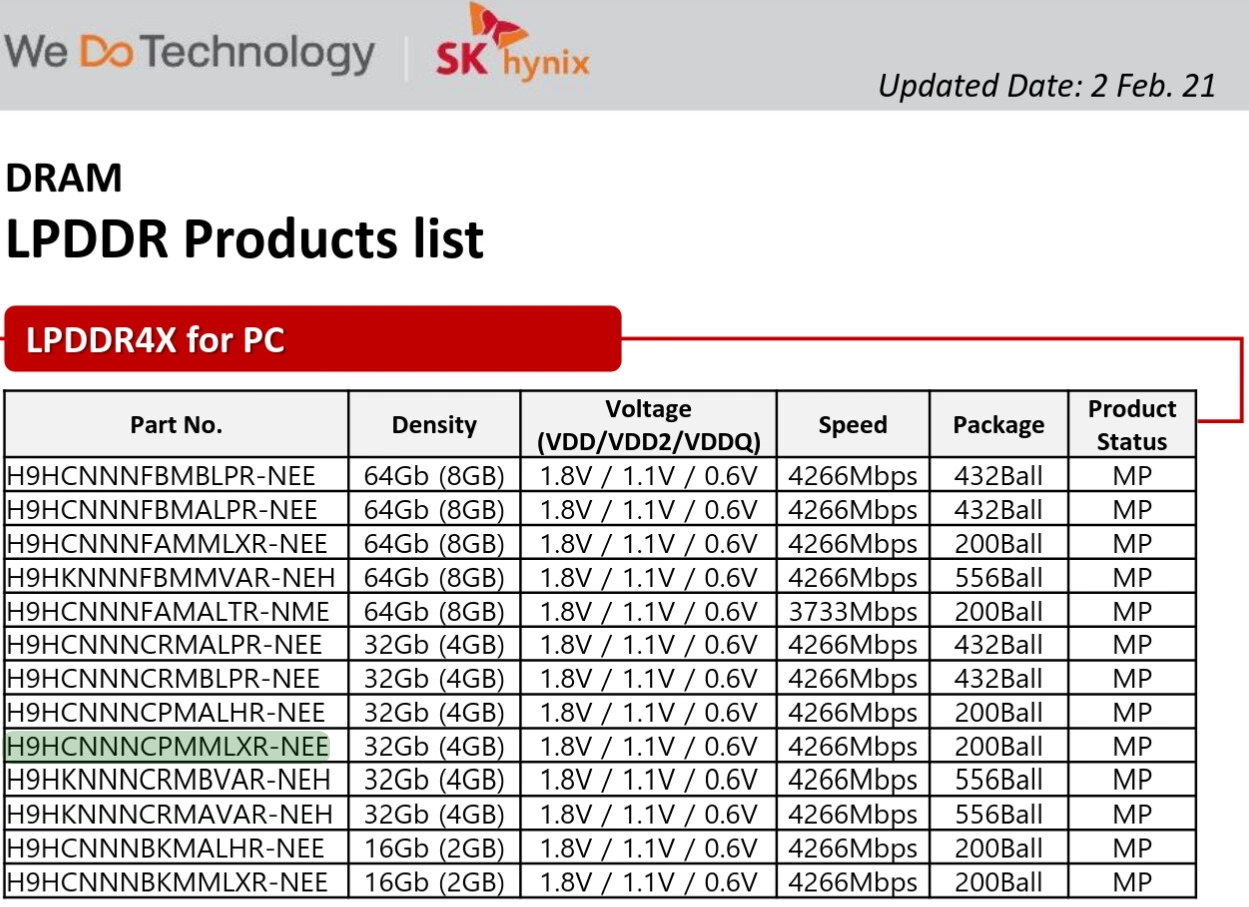
| Part No | Density | Voltage(VDD/VDD2/VDDQ) | Speed | Package | Product Status |
|---|---|---|---|---|---|
| H9HCNNNCPMMLXR-NEE | 32Gb (4GB) | 1.8V / 1.1V / 0.6V | 4266Mbps | 200Ball | MP |
查询 NAND 颗粒上开头为 TH58LKT 的丝印则没有结果。
新盘是未格式化的状态,SMART 看一下信息:
通电时间 0,电源循环次数 3,读 4.6MB,写入为 0.
功耗共有 5 档,最低待机功耗为 0.005W,最大功耗为 10W。
smartctl -a /dev/nvme0n1
# lsblk
NAME        MAJ:MIN RM   SIZE RO TYPE  MOUNTPOINTS
sda           8:0    1  59.6G  0 disk
└─sda1        8:1    1  59.6G  0 part  /run/media/liu/1E3C-9CBD
nvme0n1     259:0    0   3.7T  0 disk
...<redacted>...

# smartctl -a /dev/nvme0n1
smartctl 7.5 2025-04-30 r5714 [x86_64-linux-6.12.63-1-lts] (local build)
Copyright (C) 2002-25, Bruce Allen, Christian Franke, www.smartmontools.org

=== START OF INFORMATION SECTION ===
Model Number:                       KIOXIA-EXCERIA PRO G2 SSD
Serial Number:                      <redacted>
Firmware Version:                   AZRA4103
PCI Vendor/Subsystem ID:            <redacted>
IEEE OUI Identifier:                <redacted>
Total NVM Capacity:                 4,096,805,658,624 [4.09 TB]
Unallocated NVM Capacity:           0
Controller ID:                      1
NVMe Version:                       2.0
Number of Namespaces:               1
Namespace 1 Size/Capacity:          4,096,805,658,624 [4.09 TB]
Namespace 1 Formatted LBA Size:     512
Namespace 1 IEEE EUI-64:            <redacted>
Local Time is:                      Fri Jan  2 19:27:52 2026 CST
Firmware Updates (0x14):            2 Slots, no Reset required
Optional Admin Commands (0x0017):   Security Format Frmw_DL Self_Test
Optional NVM Commands (0x0055):     Comp DS_Mngmt Sav/Sel_Feat Timestmp
Log Page Attributes (0x0e):         Cmd_Eff_Lg Ext_Get_Lg Telmtry_Lg
Maximum Data Transfer Size:         64 Pages
Warning  Comp. Temp. Threshold:     83 Celsius
Critical Comp. Temp. Threshold:     85 Celsius
Namespace 1 Features (0x02):        NA_Fields

Supported Power States
St Op     Max   Active     Idle   RL RT WL WT  Ent_Lat  Ex_Lat
 0 +    10.00W       -        -    0  0  0  0        1       1
 1 +     3.00W       -        -    1  1  1  1        1       1
 2 +     1.50W       -        -    2  2  2  2        1       1
 3 -   0.0500W       -        -    3  3  3  3      990     990
 4 -   0.0050W       -        -    4  4  4  4     4990   44990

Supported LBA Sizes (NSID 0x1)
Id Fmt  Data  Metadt  Rel_Perf
 0 +     512       0         0
 1 -    4096       0         0

=== START OF SMART DATA SECTION ===
SMART overall-health self-assessment test result: PASSED

SMART/Health Information (NVMe Log 0x02, NSID 0xffffffff)
Critical Warning:                   0x00
Temperature:                        25 Celsius
Available Spare:                    100%
Available Spare Threshold:          10%
Percentage Used:                    0%
Data Units Read:                    9 [4.60 MB]
Data Units Written:                 0
Host Read Commands:                 231
Host Write Commands:                0
Controller Busy Time:               0
Power Cycles:                       3
Power On Hours:                     0
Unsafe Shutdowns:                   0
Media and Data Integrity Errors:    0
Error Information Log Entries:      0
Warning  Comp. Temperature Time:    0
Critical Comp. Temperature Time:    0
Temperature Sensor 1:               25 Celsius

Error Information (NVMe Log 0x01, 16 of 256 entries)
No Errors Logged

Self-test Log (NVMe Log 0x06, NSID 0xffffffff)
Self-test status: No self-test in progress
No Self-tests Logged
虽然背面印有 PSID,但是 sedutil 一扫发现该盘并不支持 OPAL。(问题不大,继续用更成熟和安全的 LUKS)
sedutil-cli --scan
Scanning for Opal compliant disks
/dev/nvme0 No  KIOXIA-EXCERIA PRO G2 SSD                .....
性能测试
官方数据:
顺序读:14,900 MB/s
顺序写:13,700MB/s
随机读:2,300,000 IOPS
随机写:1,950,000 IOPS
我没有 PCIe5.0 的平台,只能用 PCIe4.0 的 X570 平台测试。
将磁盘格式化为 ext4 格式,下面是使用 KDiskMark 的测试结果:
                        KDiskMark (3.2.0): https://github.com/JonMagon/KDiskMark
                    Flexible I/O Tester (fio-3.41): https://github.com/axboe/fio
--------------------------------------------------------------------------------
* MB/s = 1,000,000 bytes/s [SATA/600 = 600,000,000 bytes/s]
* KB = 1000 bytes, KiB = 1024 bytes

[Read]
Sequential   1 MiB (Q=  8, T= 1):  6835.751 MB/s [   6675.5 IOPS] <  1153.75 us>
Sequential   1 MiB (Q=  1, T= 1):  5090.365 MB/s [   4971.1 IOPS] <   139.57 us>
    Random   4 KiB (Q= 32, T= 1):   817.380 MB/s [ 204345.1 IOPS] <   152.80 us>
    Random   4 KiB (Q=  1, T= 1):    98.699 MB/s [  24674.8 IOPS] <    37.01 us>

[Write]
Sequential   1 MiB (Q=  8, T= 1):  6208.955 MB/s [   6063.4 IOPS] <  1163.73 us>
Sequential   1 MiB (Q=  1, T= 1):  3161.453 MB/s [   3087.4 IOPS] <   159.75 us>
    Random   4 KiB (Q= 32, T= 1):   501.767 MB/s [ 125441.9 IOPS] <   251.30 us>
    Random   4 KiB (Q=  1, T= 1):   252.993 MB/s [  63248.5 IOPS] <    11.87 us>

Profile: Default
   Test: 1 GiB (x5) [Measure: 5 sec / Interval: 5 sec]
   Date: 2026-01-02 20:06:10
     OS: arch unknown [linux 6.12.63-1-lts]
 Target: /mnt/p1 0% (0.00/3.67 TiB) [KIOXIA-EXCERIA PRO G2 SSD]
LBA Sizes 大小出厂默认是 512,改成 4096 再测一次,几乎没有区别。
LBA Size=4096 测试结果
``` KDiskMark (3.2.0): https://github.com/JonMagon/KDiskMark Flexible I/O Tester (fio-3.41): https://github.com/axboe/fio -------------------------------------------------------------------------------- * MB/s = 1,000,000 bytes/s [SATA/600 = 600,000,000 bytes/s] * KB = 1000 bytes, KiB = 1024 bytes[Read]
Sequential 1 MiB (Q= 8, T= 1): 6898.646 MB/s [ 6737.0 IOPS] < 1144.66 us>
Sequential 1 MiB (Q= 1, T= 1): 5150.503 MB/s [ 5029.8 IOPS] < 141.96 us>
Random 4 KiB (Q= 32, T= 1): 831.733 MB/s [ 207933.3 IOPS] < 150.14 us>
Random 4 KiB (Q= 1, T= 1): 100.157 MB/s [ 25039.3 IOPS] < 36.46 us>
[Write]
Sequential 1 MiB (Q= 8, T= 1): 6335.782 MB/s [ 6187.3 IOPS] < 1143.98 us>
Sequential 1 MiB (Q= 1, T= 1): 3098.594 MB/s [ 3026.0 IOPS] < 162.99 us>
Random 4 KiB (Q= 32, T= 1): 509.326 MB/s [ 127331.6 IOPS] < 247.53 us>
Random 4 KiB (Q= 1, T= 1): 258.296 MB/s [ 64574.1 IOPS] < 11.65 us>
Profile: Default
Test: 1 GiB (x5) [Measure: 5 sec / Interval: 5 sec]
Date: 2026-01-02 20:26:42
OS: arch unknown [linux 6.12.63-1-lts]
Target: /mnt/p1 0% (0.00/3.67 TiB) [KIOXIA-EXCERIA PRO G2 SSD]
差别很小,说明根本无需改。
</details>
Windows 下用 TxBench 进行 RAW 全盘写入测试,根据 csv 格式的 log,使用 pyplot 作图如下:
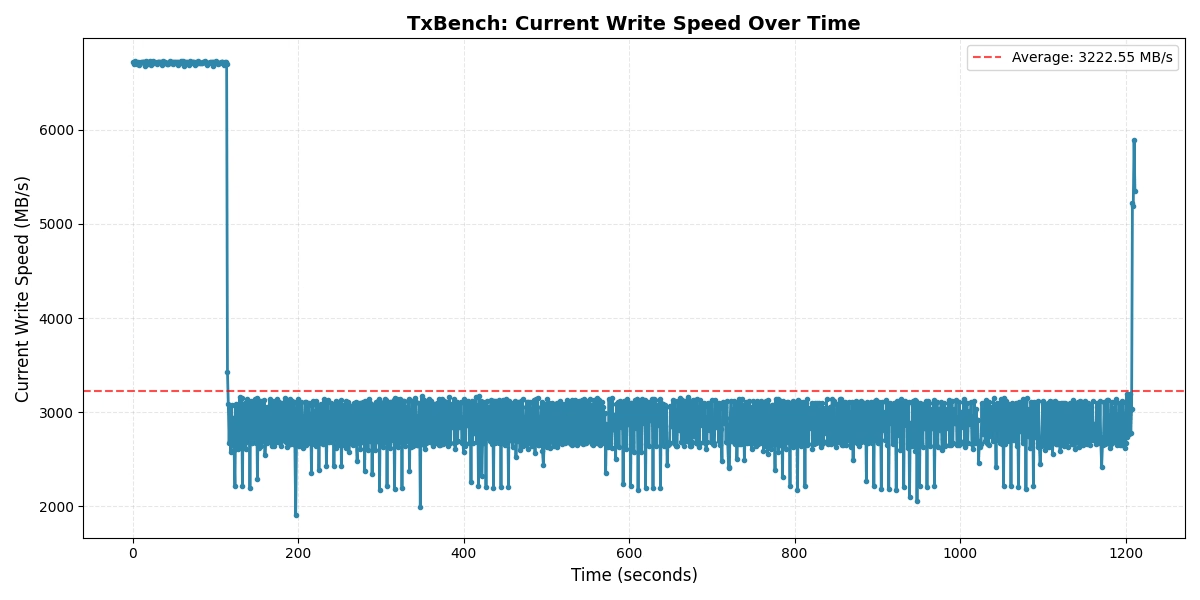
共计用时 20 分钟 11 秒。
在 1 分 53 秒处,曲线呈断崖下降,提示此时模拟的 SLC Cache 用尽,此时共写入了 `799175081984/1024**3=744.289794921875`GB 的数据。
全程写入速率:
平均:3222.55 MB/s
最大:6728.33 MB/s
最小:1909.07 MB/s
标准差 (std dev) 1156.98 MB/s
如果只看中间这部分:
平均:2852.64 MB/s
最大:3432.20 MB/s
最小:1909.07 MB/s
标准差:254.04 MB/s
由于接的是 PCIe4.0 接口,本测试前段只能达到 PCIe4.0x4 的极限:7GB/s,PCIe5.0 平台上应该为 14GB/s。但中间部分速率仍有一定参考价值。
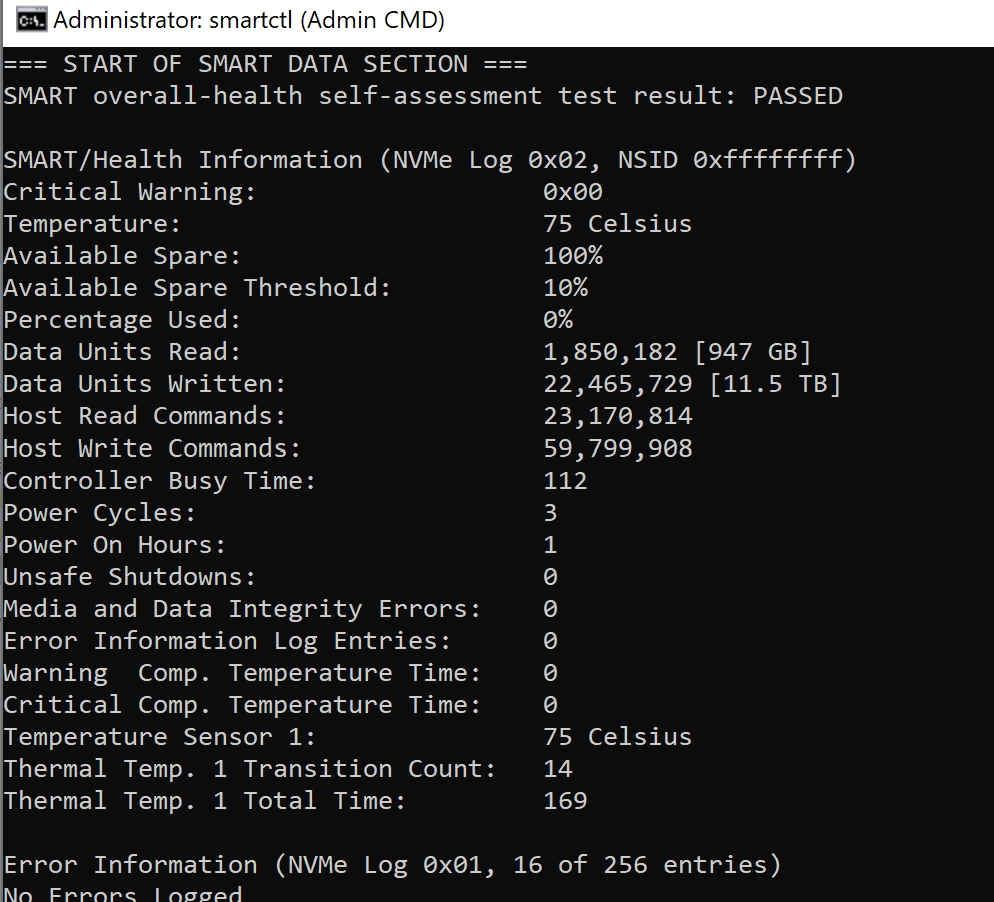
期间使用 [SMART 监控工具](https://github.com/smartmontools/smartmontools) 查看硬盘温度,起始温度 33°C,持续写入中温度为 78°C 左右波动,考虑到没有散热措施(金属马甲/风扇),这一表现符合 SM2508 主控 SSD 的一贯良好预期。
<details><summary>TxBench 原始数据表</summary>
[KIOXIA_EXCERIA_PRO_G2_Full_Disk_Wrtie_202601022226191.csv|attachment](/uploads/blob/59/dc/59dcb8bfb6de0ccf12740ef622f57499b17769f00063fdea21bc576e3fdb00f1.csv) (354.0 KB)
|Lapsed time|Current read mB/s|Current write mB/s|Current read MB/s|Current write MB/s|Current read IO/s|Current write IO/s|Current read average response (ms)|Current write average response (ms)|Current read minimum response (ms)|Current write minimum response (ms)|Current read maximum response (ms)|Current write maximum response (ms)|Number of read bytes |Number of written bytes |Number of read I/O|Number of written I/O|Total read mB/s|Total write mB/s|Total read MB/s|Total write MB/s|Total read IO/s|Total write IO/s|Total read average response (ms)|Total write average response (ms)|Total read minimum response (ms)|Total write minimum response (ms)|Total read maximum response (ms)|Total write maximum response (ms)|Total number of bytes read|Total number of bytes written|Total number of I/O read|Total number of I/O written|
|---|---|---|---|---|---|---|---|---|---|---|---|---|---|---|---|---|---|---|---|---|---|---|---|---|---|---|---|---|---|---|---|---|
|0:01:53:603|0|7027.361015|0|6701.813712|0|26807.25485|0|1.192954|0|0.7073|0|7.4012|0|7043547136|0|26869|0|7035.798521|0|6709.860345|0|26839.44138|0|1.191477|0|0.0907|0|7.5914|0|799175081984|0|3048611|
|0:01:54:605|0|3598.920936|0|3432.198464|0|13728.793854|0|2.328687|0|1.1484|0|14.9282|0|3609460736|0|13769|0|7005.717836|0|6681.173168|0|26724.692674|0|1.19659|0|0.0907|0|14.9282|0|802784542720|0|3062380|
</details>
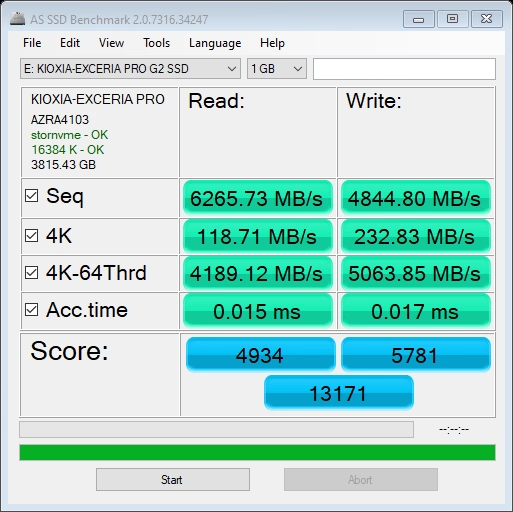
AS SSD Benchmark 测试截屏:
Crystal Disk Mark 测试结果如下,相比于 KDiskMark 要好一些:
CrystalDiskMark 9.0.1 x64 (C) 2007-2025 hiyohiyo
Crystal Dew World: https://crystalmark.info/
- MB/s = 1,000,000 bytes/s [SATA/600 = 600,000,000 bytes/s]
- KB = 1000 bytes, KiB = 1024 bytes
[Read]
SEQ 1MiB (Q= 8, T= 1): 7470.465 MB/s [ 7124.4 IOPS] < 1122.36 us>
SEQ 1MiB (Q= 1, T= 1): 6261.717 MB/s [ 5971.6 IOPS] < 167.36 us>
RND 4KiB (Q= 32, T= 1): 616.210 MB/s [ 150441.9 IOPS] < 41.02 us>
RND 4KiB (Q= 1, T= 1): 103.547 MB/s [ 25280.0 IOPS] < 39.46 us>
[Write]
SEQ 1MiB (Q= 8, T= 1): 7016.232 MB/s [ 6691.2 IOPS] < 1193.96 us>
SEQ 1MiB (Q= 1, T= 1): 6109.955 MB/s [ 5826.9 IOPS] < 171.49 us>
RND 4KiB (Q= 32, T= 1): 458.337 MB/s [ 111898.7 IOPS] < 17.86 us>
RND 4KiB (Q= 1, T= 1): 267.992 MB/s [ 65427.7 IOPS] < 15.17 us>
Profile: Default
Test: 1 GiB (x3) [E: 0% (0/3815GiB)]
Mode: [Admin]
Time: Measure 5 sec / Interval 5 sec
Date: 2026/01/02 20:58:20
OS: Windows 10 Pro 22H2 [10.0 Build 19045] (x64)
哇哇都买好东西。
硬盘越发贵了,够我等等党等很久
 hoist
hoist 我就是感觉这波存储涨价的行情会持续很久才趁没涨太多购买的,毕竟固态这种产品基本不会坏。