whl
@whl
whl
@whl
-
 Anonymous Coward Old Post #1
我相信透明带来的安全,所以在这里把技术架构通通告诉大家,方便新功能的开发、发现现有的问题,如果你也想建一个这样的网站也可以作为参考。
可以通过 https://xjtu.app/t/topic/127 页面看到,我们在 Discourse 的基础上添加了许多功能。下面将事无巨细地交代:
单一源站:Discourse
在一台安全稳定的服务器上:
pacman -S docker git
systemctl enable --now docker
cd /var/
git clone https://github.com/discourse/discourse_docker.git discourse
cd discourse
./launcher rebuild app
多个反向代理服务器
源站位于高可靠性机器上,但是网络对于中国不是最优的,所以配置反向代理,采用多台优质回国线路、但是配置普通的机器加速:
https://xjtu.app/t/topic/4330/6
配置文件
/etc/systemd/system/caddy.service[Unit] Description=Caddy Documentation=https://caddyserver.com/docs/ After=network.target network-online.target Requires=network-online.target [Service] User=caddy Group=caddy Environment="ASSUME_NO_MOVING_GC_UNSAFE_RISK_IT_WITH=go1.20" ExecStart=/usr/bin/caddy run --environ --config /etc/caddy/Caddyfile ExecReload=/usr/bin/caddy reload --config /etc/caddy/Caddyfile TimeoutStopSec=5s LimitNOFILE=1048576 LimitNPROC=512 PrivateTmp=true ProtectSystem=full AmbientCapabilities=CAP_NET_BIND_SERVICE [Install] WantedBy=multi-user.target/etc/caddy/Caddyfile.normal{ #auto_https off } xjtu.app:443, xjtu.app:443, xjtu.love:443 { import /etc/caddy/hsts-xjtu @default { not path /xjtumen-custom-api/* /xjtumen-g/* /xjtumen-res/* /ip } reverse_proxy @default unix//var/discourse/shared/standalone/nginx.http.sock reverse_proxy /xjtumen-custom-api/* 127.0.0.1:7010 # reverse_proxy /xjtumen-res/* https://res.xjtu.app # handle /xjtumen-res/* { # uri strip_prefix /xjtumen-res # reverse_proxy /* https://res.xjtu.app # } import pass-ip-to-backend route /ip { rate_limit {remote.ip} 10r/m } redir /xjtumen-g /xjtumen-g/ 308 route /xjtumen-g/ { rate_limit {remote.ip} 60r/m } handle /xjtumen-g/* { uri strip_prefix /xjtumen-g root /xjtumen-g/* /var/g/ file_server { browse hide .git } } log { output file /var/log/caddy/xjtu } } import /etc/caddy/common/etc/caddy/Caddyfile.rebuildxjtu.app:443, xjtu.app:443, xjtu.love:443 { import /etc/caddy/hsts-xjtu respond "交大門正在更新,预计 10min 内完成。Thanks for your patience!" #root * /usr/share/nginx/xjtu-men-maintainence/ #root * /var/www/xjtu.app #file_server #rewrite / index.html log { output file /var/log/caddy/xjtu-rebuild } } import /etc/caddy/common/etc/caddy/commonwww.xjtu.app:443, www.xjtu.app:443, www.xjtu.love:443 { import /etc/caddy/hsts-xjtu redir https://xjtu.app{uri} 301 }/etc/caddy/hsts-xjtutls /etc/caddy/ssl/xjtu.app.cer /etc/caddy/ssl/xjtu.app.key header { Strict-Transport-Security "max-age=31536000; includeSubDomains; preload" X-Xss-Protection "1; mode=block" X-Content-Type-Options "nosniff" Content-Security-Policy "upgrade-insecure-requests" Referrer-Policy "strict-origin-when-cross-origin" Cache-Control "public, max-age=15, must-revalidate" Permissions-Policy interest-cohort=() Feature-Policy "accelerometer 'none'; ambient-light-sensor 'none'; autoplay 'self'; camera 'none'; encrypted-media 'none'; fullscreen 'self'; geolocation 'none'; gyroscope 'none'; magnetometer 'none'; microphone 'none'; midi 'none'; payment 'none'; picture-in-picture *; speaker 'none'; sync-xhr 'none'; usb 'none'; vr 'none'" }/etc/caddy/pass-ip-to-backend# https://caddyserver.com/docs/modules/http reverse_proxy /ip 127.0.0.1:7001 { header_up X-Real-IP {http.request.header.CF-Connecting-IP} header_up X-Forwarded-For {http.request.header.CF-Connecting-IP} header_up REMOTE_HOST {http.request.remote.host} header_up REQ_HOST {http.request.host} header_up REQ_HOSTPORT {http.request.hostport} header_up REMOTE_PORT {http.request.remote.port} header_up DURATION_MS {http.request.duration_ms} header_up UUID {http.request.uuid} header_up SCEME {http.request.scheme} header_up TLS_VER {http.request.tls.version} header_up TLS_CIPHER {http.request.tls.cipher_suite} header_up TLS_PROTO {http.request.tls.proto} header_up PROTO {http.request.proto} header_up TLS_RESUMED {http.request.tls.resumed} header_up TLS_SERVER_NAME {http.request.tls.server_name} header_up REQ_URI {http.request.uri} header_up REQ_METHOD {http.request.method} header_up REQ_ORIG_METHOD {http.request.orig_method} header_up RES_CACHE_CONTROL {http.response.header.cache-control} header_up RES_CONTENT_LEN {http.response.header.content-length} header_up RES_CONTENT_TYPE {http.response.header.content-type} header_up RES_DATE http.response.header.date} header_up RES_CSP {http.response.header.content-security-policy} }go install github.com/caddyserver/xcaddy/cmd/xcaddy@latest ~/go/bin/xcaddy build --with github.com/xjtu-men/caddy-ratelimit@latest --with github.com/mholt/caddy-l4 --with github.com/quic-go/quic-go@v0.37.4 systemctl enable --now caddy插件
一些插件在私有 GitHub 仓库里,例如
discourse-multiple-hostnames插件:git clone https://github_pat_<redacted>@github.com/xjtu-men/discourse-multiple-hostnames.githooks: after_code: - exec: cd: $home/plugins cmd: - git clone https://github.com/discourse/docker_manager - git clone https://github.com/discourse/discourse-follow - git clone https://github.com/discourse/discourse-apple-add-to-homescreen - git clone https://github.com/discourse/header-category-dropdown - git clone https://github.com/discourse/discourse-post-voting - git clone https://github.com/discourse/discourse-solved - git clone https://github.com/discourse/discourse-data-explorer - git clone https://github.com/discourse/discourse-whos-online - git clone https://github.com/discourse/discourse-calendar - git clone https://github.com/discourse/discourse-math - git clone https://github.com/discourse/discourse-reactions - git clone https://github.com/ShuiyuanSJTU/retort - git clone https://github.com/discourse/discourse-ai - git clone https://github.com/discourse/discourse-perspective-api - git clone https://github.com/discourse/discourse-github - git clone https://github.com/discourse/discourse-user-notes - git clone https://github.com/discourse/discourse-templates - git clone https://github.com/discourse/discourse-assign - git clone https://github.com/discourse/discourse-cakeday - git clone https://github.com/discourse/discourse-yearly-review - git clone https://github.com/discourse/discourse-graphviz - git clone https://github.com/discourse/discourse-bbcode - git clone https://github.com/discourse/discourse-saved-searches - git clone https://github.com/discourse/discourse-chart - git clone https://github.com/communiteq/discourse-multiple-hostnames - git clone https://github.com/mondiscourse/discourse-formatting-toolbar - git clone https://github.com/paviliondev/discourse-topic-previews-sidecar - git clone https://github.com/merefield/discourse-chatbot - git clone https://github.com/discourse/discourse-gamification - git clone https://github.com/discourse/discourse-policy - git clone https://github.com/discourse/discourse-animated-avatars - git clone https://github.com/discourse/discourse-signatures - git clone https://github.com/paviliondev/discourse-locations - git clone https://github.com/xjtumen/discourse-shadowban - git clone https://github.com/xjtumen/discourse-ip-location - git clone https://github.com/discourse/discourse-steam-login - git clone https://github.com/discourse/discourse-geoblocking - git clone https://github.com/communiteq/discourse-geo-blocking - git clone https://github.com/discourse/discourse-bcc - git clone https://github.com/discourse/discourse-shared-edits - git clone https://github.com/paviliondev/discourse-custom-wizard - git clone https://github.com/paviliondev/discourse-journal - git clone https://github.com/discourse/discourse-oauth2-basic - git clone https://github.com/discourse/discourse-openid-connect - git clone https://github.com/discourse/discourse-microsoft-auth - git clone https://github.com/discourse/discourse-hCaptcha - git clone https://github.com/discourse/discourse-user-card-badges - git clone https://github.com/communiteq/discourse-private-topics - git clone https://github.com/paviliondev/discourse-ratings - git clone https://github.com/discourse/discourse-surveys - git clone https://github.com/discourse/discourse-adplugin - git clone https://github.com/discourse/discourse-subscriptions - git clone https://github.com/discourse/discourse-akismet - git clone https://github.com/discourse/discourse-custom-topic-lists - git clone https://github.com/xjtumen/discourse-group-membership-ip-block - git clone https://github.com/discourse/discourse-chat-integration - git clone https://github.com/davidtaylorhq/discourse-telegram-notifications - git clone https://github.com/fokx/discourse-cjk-formatter - git clone https://github.com/Lemon-planting-light/user-autonomy-plugin - git clone https://github.com/Lhcfl/discourse-post-folding - git clone https://github.com/discourse/discourse-preset-topic-composer - git clone https://github.com/xjtumen/discourse-staff-alias - exec: cd: $home/plugins/discourse-animated-avatars raise_on_fail: false cmd: - $home/plugins/discourse-animated-avatars/scripts/install.sh以下是插件列表:
-
docker_manager
允许在网页端进行管理,包括调用 docker 更新命令,注意:可能会失败,而且失败后有一定概率损坏浏览器缓存,并需要命令行 rebuild app。建议不使用热更新。 -
discourse-follow
Follow 其他用户 -
discourse-apple-add-to-homescreen
针对苹果用户的浏览器显示“添加到主屏幕”提示。Android 的提示(PWA)集成在 Core 里。 -
discourse-activity-pub
理论上允许和 Mastodon 互联,但没有成功过。 -
header-category-dropdown
允许在最上栏显示下拉菜单,暂时没用到。 -
discourse-post-voting
在话题内,对后续的回复进行 Up/Down Voting -
discourse-topic-voting
发表投票/调查话题,允许多选/单选。 -
discourse-teambuild
类似于让門友做任务,暂时没用到 -
discourse-solved
将回答中的某个回答设为“已解决”,适合于提问帖 -
discourse-data-explorer
在网页端调用数据库查询,仅限管理员使用 -
discourse-whos-online
查看当前在线情况,仅限管理员使用 -
discourse-calendar
日历支持 -
discourse-math
支持 Latex 数学公式,单行/多行。可选后端:MathJAX / KaTex -
discourse-reactions
用更多 emoji 对话题作出回应,默认只有 ❤️ -
discourse-ai
众多 AI 功能 -
discourse-perspective-api
调用 Google Perspective API 分析帖文是否违反社区规范 -
discourse-github
和 GitHub 联动,例如 issues 和 pull request -
discourse-user-notes
用于 mod 对用户进行备注 -
discourse-encrypt
端到端聊天加密 -
discourse-automation
执行自动化任务,当前尚未使用,后续准备用来更新 https://xjtu.app/t/topic/1584 的 https://xjtu.app/tag/empty 标签 -
discourse-templates
允许设置话题的模板 -
discourse-assign
允许将话题分配给某些人,适合于问答场景。 -
discourse-ai-topic-summary
使用 AI 对长话题进行总结 -
discourse-user-network-vis
可视化社交关系 -
discourse-nationalflags
国旗扩展 -
discourse-telegram-notifications
同步到 Telegram 消息 -
discourse-word-cloud
字数统计 -
discourse-chatbot
主页上悬浮的 AIBot 和可以私聊/私信的 AIBot -
discourse-layouts
自定义页面布局 -
discourse-locations
支持定位功能,目前想不到应用场景,暂未启用 -
discourse-topic-list-previews
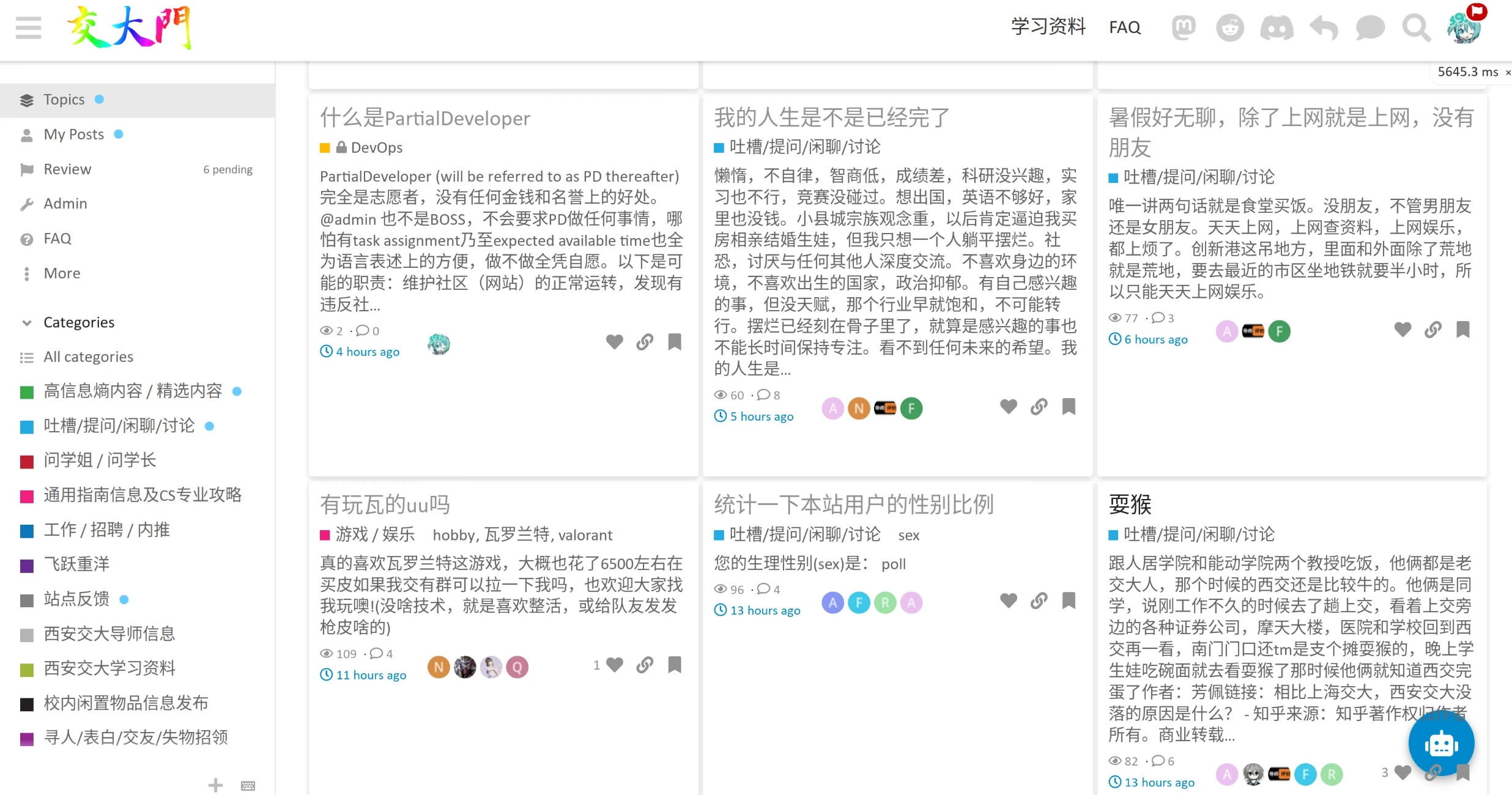
启用 Discourse 默认的一行行帖子的用户界面,实现类似于小红书之类软件的瀑布流效果(列数随浏览器宽度自动调整,移动端只有一列)。但由于全屏幕帖子数量少,以及未知原因造成的偶尔出现从主题返回主页慢的问题,因而只在 redditish 和 Material Design 这两个主题启用(FKBPro 自带主题内容预览功能,也可一试),可以在用户偏好里设置。
-
discourse-multiple-hostnames
允许 Discourse 用多域名访问(注意app.yml里只能配置一个域名,它将作为 canonical name 用户)搜索引擎检索,因而可以看成是反向代理域名白名单列表
えしりなか,post:6, topic:4330:-
xjtu.app
San Jose, CA
优质中国电信 CN2 GIA,电信、联通、移动、教育网都是当前国际联网最优的线路。仅 IPv4。 -
xjtu.love 域名:
San Francisco, CA
普通线路 AS4134 China Telecom Backbone
Arelion / Telia / twelve99 动态 BGP 路由
平常也可使用,或者当.men, .live 全都挂掉的时候备用。IPv4/IPv6 双线。
可参考下图:
-
discourse-anonymous-post
允许匿名回复/发贴,无需登录即可使用,只需点击右上的回复按钮。 -
discourse-autobot
从其他消息源自动拉取更新并发帖。 -
discourse-shadowban
残忍的 Shadowban,仅发帖人可见自己的帖子,其他人/未登录者看不到,仅用于短时间应对极端刷屏用户。 -
retort
自选 eomji 回应回复,来自上交维护的 ShuiyuanSJTU/retort,fork 自早已 EOF 的 gdpelican/retort。
服务器状态
root@archlinuxDO ~ # df -h
Filesystem      Size  Used Avail Use% Mounted on
dev             978M     0  978M   0% /dev
run             987M  676K  986M   1% /run
/dev/vda1        59G   44G   13G  78% /
tmpfs           987M  1.1M  985M   1% /dev/shm
tmpfs           987M  4.8M  982M   1% /tmp
overlay          59G   44G   13G  78% /var/lib/docker/overlay2/cfceca63649b674ce9a0706ebb64ecbd6b58389a73f3981226ff9387c04be342/merged

root@archlinuxDO ~ # free -h
               total        used        free      shared  buff/cache   available
Mem:           1.9Gi       1.7Gi       127Mi        35Mi       303Mi       220Mi
Swap:          4.0Gi       2.4Gi       1.6Gi


root@archlinuxDO ~ # uptime
 21:57:44 up 3 days,  7:32,  2 users,  load average: 0.34, 0.45, 0.39
Theme (Component)
Theme
不同的主题不仅颜色、界面不同,而且启用的 Theme Component 不同,如果你不喜欢某种功能,可以尝试不同的主题。在不同的设备上也可以选择不同的主题。
- DiscourseDefault
默认和推荐主题,主题的话题列表是单列。
无话题内容预览。
有显示额外信息的侧边栏,如话题类别,热门 tag,常用链接等。另外 Material Design 也有该侧边栏。如果不喜欢可以换用其他主题。移动设备上没有侧边栏。
-
FKB Pro Theme
采用类似 Win11 的圆角设计,有话题图文预览。无侧边栏。 -
graceful
也有柔和的边角设计,但不建议移动端使用,因为边缘间隙比较大。无侧边栏。 -
Material Design Theme
Material Design 风格,移动端倒是感觉不到,有话题图文预览,采用砖块/窗口式帖子列表,可自动根据页面缩放自动调节列数,有侧边栏。 -
redditish
Reddit 风格,有话题图文预览。侧边栏仅显示最近的话题。
Theme Component
被移除的 TC
https://github.com/discourse/discourse-category-badge-styles.git
https://github.com/VaperinaDEV/custom-embedded-replies.git
https://github.com/discourse/discourse-colorful-categories.git
https://github.com/xjtu-men/discourse-gray-filter
https://github.com/xjtu-men/discourse-hide-ip-info.git
https://github.com/Lhcfl/discourse-larger-long-image.git
https://github.com/fokx/discourse-marquee.git
https://github.com/xjtumen/discourse-matomo-analytics
https://github.com/literatecomputing/discourse-qrcode-wrap-theme-component.git
https://github.com/discourse/discourse-thin-header-theme-component.git
https://github.com/discourse/Discourse-Tiles-image-gallery.git
https://github.com/Arkshine/discourse-chat-sidebar.git
https://github.com/VaperinaDEV/discourse-stickers.git
被禁用的 TC
https://github.com/discourse/discourse-category-icons.git
https://github.com/xjtumen/discourse-custom-header-links.git
https://github.com/awesomerobot/discourse-button-styles.git
https://github.com/Arkshine/discourse-fireworks/tree/mobile-support-and-settings
https://github.com/discourse/discourse-gated-topics-in-category.git
https://github.com/discourse/discourse-icon-header-links.git
所有 TC
-
Anonymous Post
和插件配合实现不登录发帖/回复。 -
Colorful categories
根据不同的类别改变界面的颜色,不改变顶栏颜色,因为屏幕对比度太高、有长条色块容易晃眼睛。 -
Custom Header Links
在顶栏插入链接,如评课社区和学习资料。 -
Icon Header Links
顶栏添加图标超链接 -
Dark-Light Toggle
允许手动切换亮暗色主题,一般是不需要的,可以自动识别浏览器的亮暗状态。 -
DiscoTOC
自动添加目录,无需任何人工操作 -
discourse-buttons
定制按钮颜色和形状如圆角 -
Discourse Clickable Topic
话题的整个区域都可点击,不仅仅是标题文字 -
discourse-gifs
编辑器 GIPHY / Tenor 表情包 GIF -
discourse-right-sidebar-blocks
侧边栏 -
PDF previews
页面内嵌入 pdf,无需下载,无需新标签页打开 -
Play G Widget
game widget -
QR Code Inserter
编辑器插入 QR Code(quick-response code,二维码),可以是到任意 URL,或者是本当前页面(url 参数为空时) -
Showcased Categories
侧边栏展示两个类别 -
Table Builder
编辑器插入表格 -
Tag Cloud
可视化所有的 tag -
Text Highlighter and Coloring Composer Button (BBCODE)
编辑器支持 BBCode,以及快速高亮文本 -
Tiles - Gallery Component
最优地放置多图片 -
Topic Excerpts
显示文本预览 -
Topic Thumbnails
显示图片预览 -
Topic List Previews
图文预览 -
Topic List Item Click Animation
话题点击动画 -
xjtu.app custom theme-component
用于自定义一些 css 和 js,例如允许复制代码块内容,代码块支持 Intel One Mono 字体,调整顶栏项目的顺序 -
Brand Header Theme Component
在当前的顶栏上面在加一行,类似菜单 -
Category Headers theme component
在每个类别的主页添加自定义内容 -
Discourse Docs Card Filter
允许将某些类别设置成文档的效果 -
discourse-homepage-feature-component
主页显示 featured topic -
discourse-category-icons
category icon -
discourse-tc-character-count
character count in editor -
Category Badge Styles
category badge set to none to show icon only -
discourse-header-submenus
show submenu above normal header -
discourse-gated-topics-in-category
提示未登录用户只有登录才能查看内容 -
discourse-reply-template-component
使用模板新建话题/回复/私信
https://meta.discourse.org/t/reply-template/162373
默认主题:
https://github.com/OsamaSayegh/discourse-tab-bar-theme
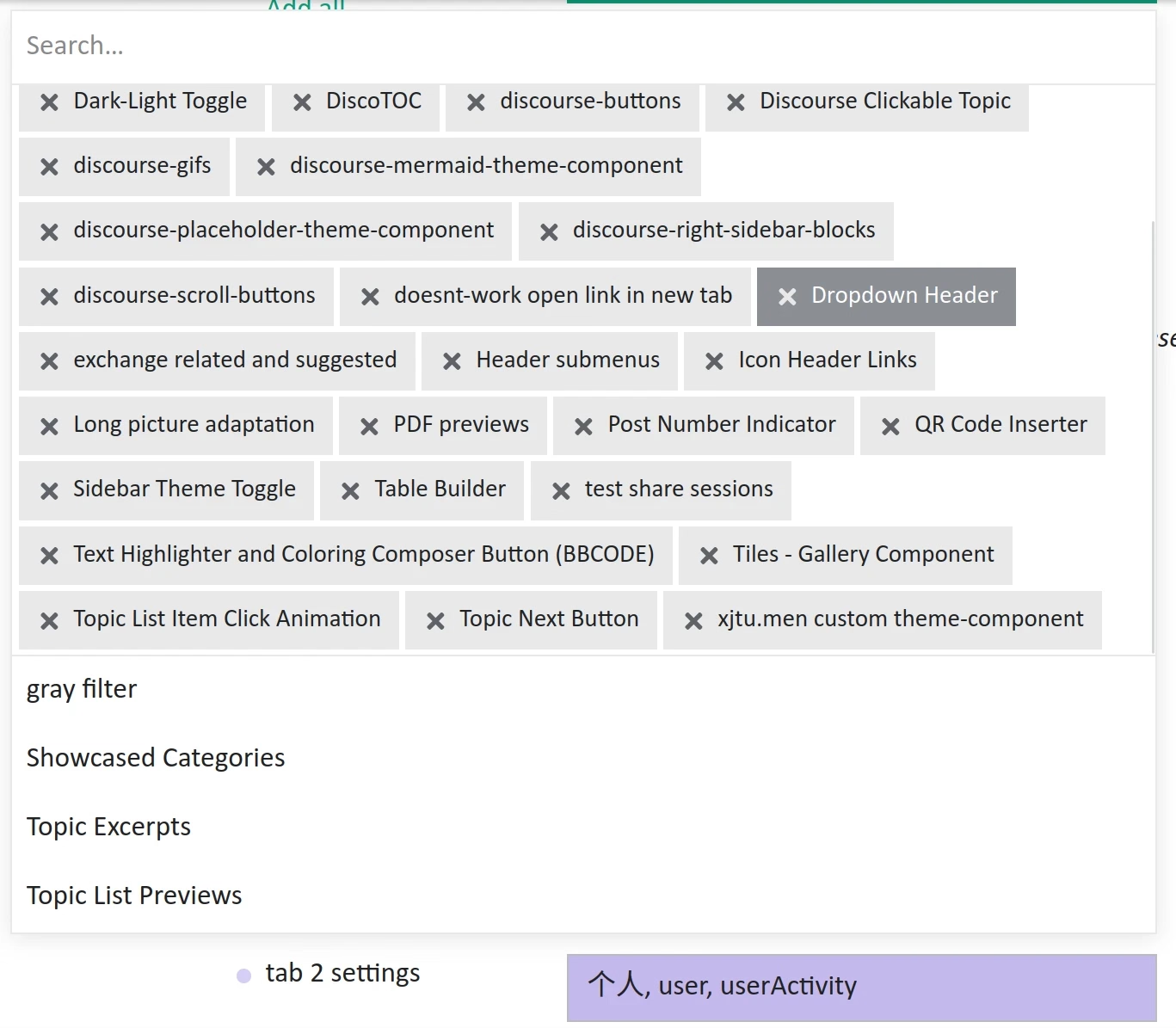
加载了的组件:
配色
用户有很多配色方案可以选择,默认是
OpenAI-Partial。参考了 OpenAI Developer Forum。OpenAI 的配色十分好看,我们想要模仿,即是可以用 console 调出:root的color_definitions.css,可惜没法完全一样。OpenAI-Partial-Dark Palette
"OpenAI-Partial-Dark": {
  "primary": "ffffff",
  "secondary": "262727",
  "tertiary": "2ec27e",
  "quaternary": "b9b4ec",
  "header_background": "111111",
  "header_primary": "dddddd",
  "highlight": "b496ff",
  "danger": "f17173",
  "success": "09cf09",
  "love": "fa6c8d",
  "selected": "183d31",
  "hover": "2d2e31"
}
OpenAI-Partial Palette
"OpenAI-Partial": {
  "primary": "202123",
  "secondary": "ffffff",
  "tertiary": "10a37f",
  "quaternary": "715fde",
  "header_background": "ffffff",
  "header_primary": "333333",
  "highlight": "482da8",
  "danger": "ef4146",
  "success": "009900",
  "love": "fa6c8d",
  "selected": "e6f3f3",
  "hover": "f7f7f8"
}
在线配置
网页端可以改不少配置选项,比较重要的有:
- base font 以及针对 code blocks 使用 Intel One Mono
- 固定左边栏类别的顺序,调整移动设备上顶栏按钮的顺序和桌面/移动端可见性
- 调整“提醒注册”的 banner 对已登录用户不可见
- 中文帖名和内容的长度,用户名长度限制,保留的用户名及 regex
- 不同 Trust Level 实现的条件、允许的功能和 rate limit (incl. API key)
- max image size kb, max attachment size kb, 需要./launcher enter app 改 nginx 的配置
- AI 模型选择和服务网址
存在的问题
- Discourse docker 容器里面使用
nginx做服务器,监听到 unix socket,再用宿主机caddy反代,存在性能损失(unix socket 很高效,可以忽略)和不必要的内存占用 - nftables 和 docker 冲突,
没有配置防火墙已采用云服务商防火墙
-